
Azure Virtual Desktop (AVD) can feel like a sprawl of resources the first time you open the portal — host pools, workspaces, application groups, session hosts, a control plane you don’t manage. This post breaks the architecture down into the pieces that matter and how they fit together.
The two halves: control plane vs. your resources
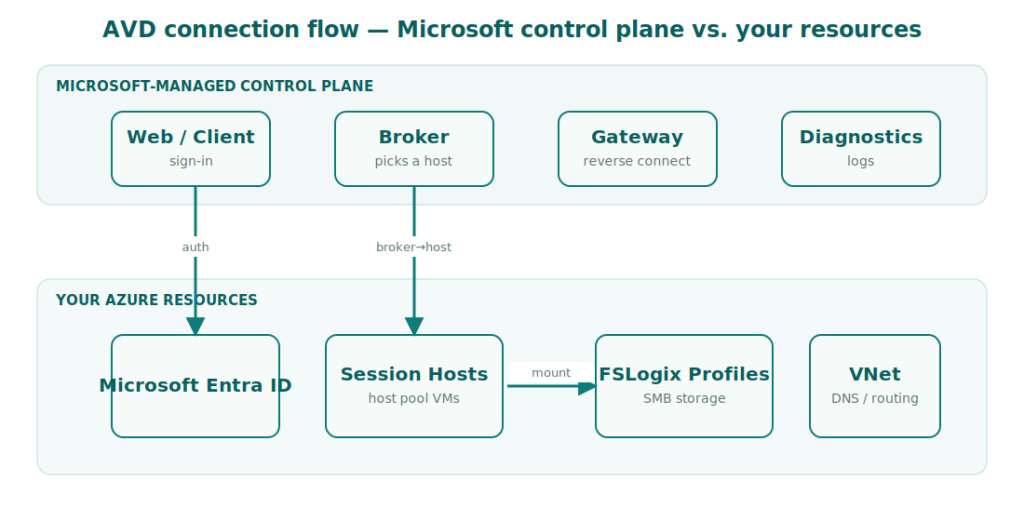
AVD splits cleanly into two layers. Microsoft runs the control plane — the web access, gateway, broker, diagnostics and load-balancing services. You never patch or scale these; they’re part of the managed service. What you own and pay for are the session host VMs, their storage, networking and the supporting identity.
Why this matters
Because Microsoft owns the brokering and gateway layer, your design effort goes almost entirely into session hosts, profiles, networking and images — not into building connection infrastructure the way you did with on-prem RDS or Citrix.
Host pools: the core building block
A host pool is a collection of identical session host VMs. It’s the unit you scale, image and assign users to. There are two types, and choosing correctly is the single most consequential early decision:
| Type | Behaviour | Best for |
|---|---|---|
| Pooled | Many users share each host; users land on any available host | Task/knowledge workers, cost efficiency, standardised desktops |
| Personal | Each user is permanently assigned their own host | Developers, power users, persistent state, GPU workloads |
Pooled host pools are where most of the cost savings live, because one VM serves many users. Personal host pools behave more like a cloud PC — simpler to reason about, but you pay per user.
Session hosts
Session hosts are just Windows VMs (multi-session Windows 11/10 Enterprise, or single-session client SKUs) joined to your network and registered to a host pool via the AVD agent. Key design levers:
- VM size — balance vCPU/RAM against users-per-host; over-dense hosts feel slow, under-dense ones waste money.
- Multi-session vs. single-session — multi-session maximises density; single-session suits personal pools and specialised apps.
- Join type — Microsoft Entra join (cloud-only) or Active Directory / Entra hybrid join, depending on your identity and resource-access needs.
Workspaces and application groups
Users don’t connect to host pools directly — they connect to what an application group publishes, surfaced through a workspace:
- Desktop application group — publishes a full desktop. One per host pool.
- RemoteApp application group — publishes individual apps that open in their own window, as if local.
- Workspace — the logical bundle of application groups a user sees in their client.
A clean pattern: one host pool → one desktop app group (and optionally RemoteApp groups) → grouped into a workspace, with Entra ID groups assigned to the app groups for access.
How a connection actually flows
- The user signs in to the AVD client and authenticates against Microsoft Entra ID.
- The workspace shows the resources (desktops/apps) they’re assigned.
- On launch, the control-plane broker picks an available session host (load-balanced for pooled pools).
- The gateway brokers a reverse-connect session — no inbound ports on your VMs.
- The user lands on the host; FSLogix mounts their profile; their apps appear.
Reverse connect = no inbound RDP
AVD session hosts never need inbound RDP from the internet. The host initiates an outbound connection to the gateway, which is a major security advantage over traditional RDS gateways.
The supporting cast you must plan for
- Profiles — FSLogix on Azure Files or Azure NetApp Files (its own deep topic).
- Networking — a VNet with line of sight to identity (DCs or Entra), DNS, and any on-prem resources.
- Images — a golden image strategy so every host is consistent and patchable.
- Scaling — autoscale scaling plans so you’re not running every host 24×7.
A sensible starting topology
For a first production deployment, a reliable shape is: a dedicated AVD VNet peered to your hub; one pooled host pool for general users plus one personal pool for power users; FSLogix on Azure Files Premium; a golden image built from automation; and an autoscale plan aligned to business hours. Everything else layers onto that spine.
Get the host-pool type, identity join and profile storage right at the start — they’re the decisions that are painful to change later. Everything else (images, scaling, app delivery) can be iterated once the spine is solid.
Need a hand with your AVD platform? 🚀
I help organisations design, migrate and optimise Azure Virtual Desktop. If you’re planning or troubleshooting a deployment, get in touch.
